Skip to content

Everything you can enable.

56 modules connected on a single platform. Start with what you need today and, as you grow, enable the rest without switching systems.

56 modules in9areas. The ones you need todayand the ones you’ll need next.

  • 11

    Finance and accounting

    Books up to date without typing twice.

    • General ledger
    • Accounts receivable
    • Accounts payable
    • Treasury and banks
    • Bank reconciliation
    • Cash flow
    • Fixed assets
    • Budgets
    • Costs and cost centers
    • Supplier withholdings and advances
    • Multi-company and multi-currency
    See details for Finance and accounting
  • 8

    Sales and invoicing

    Quote, invoice and collect from one place.

    • Sales
    • E-invoicing
    • Quotes and proposals
    • Pricing and discounts
    • Kits, bundles and promotions
    • E-commerce
    • Subscriptions and recurring plans
    • Payments and payment links via WhatsApp
    See details for Sales and invoicing
  • 6

    Restaurants and point of sale

    Register, dining room and kitchen on the same order.

    • Point of sale
    • Live table map
    • Kitchen display (KDS)
    • QR digital menu and table ordering
    • Online reservations
    • Tips and cash closings
    See details for Restaurants and point of sale
  • 4

    Customers and marketing

    Serve, follow up and sell more.

    • CRM
    • WhatsApp contact center with AI
    • Email marketing and campaigns
    • Customer portal
    See details for Customers and marketing
  • 7

    Purchasing and suppliers

    Buy better and pay on time.

    • Purchasing
    • Supplier management
    • Requests for quotation
    • Purchase orders
    • Goods receipt
    • Purchase invoice reader
    • Supplier portal
    See details for Purchasing and suppliers
  • 4

    Inventory and operations

    Know what you have, where, and what’s about to expire.

    • Inventory and warehouses
    • Batches and serial numbers
    • Logistics and distribution
    • Manufacturing and production
    See details for Inventory and operations
  • 6

    People and payroll

    Payroll in hours, not days.

    • Payroll
    • Human resources
    • Attendance tracking
    • Vacations
    • Performance reviews
    • Time and shift tracking
    See details for People and payroll
  • 4

    Projects and assets

    Deliver on time and bill every hour worked.

    • Projects
    • Asset maintenance
    • Events and asset rentals
    • Document management
    See details for Projects and assets
  • 6

    Control and intelligence

    Decide with data and let the system do the work.

    • Reports and business intelligence
    • Real-time KPIs and dashboards
    • Approval workflows
    • Automations and business rules
    • AI knowledge and support center
    • Audit trail and traceability
    See details for Control and intelligence

Sell and collect

E-invoicing

Invoice in seconds, stay compliant with your country’s tax authority and stop re-entering sales into accounting.

Connects with

  • Inventory: the sale moves the stock ledger
  • Accounting: an entry for every document
  • Sales and POS: they issue the invoice
  • Invoices, credit and debit notes and every other document your country’s tax authority requires
  • Contingency mode: if the tax authority is down, you keep invoicing and documents are sent later
  • Multiple locations and points of sale, each with its own numbering
  • Document templates with your company’s branding
  • Automatic journal entry for every document issued

Sell and collect

Sales

Quote fast, close more and never promise what you don’t have in stock.

Connects with

  • CRM: the opportunity becomes a quote
  • Inventory: stock reserved from the order
  • E-invoicing: the order becomes a tax document
  • Quotes and sales orders
  • Prices with or without tax included, and document-level discounts
  • Product kits and bundles
  • Inventory reserved from the order
  • Sales dashboard and reports

Sell and collect

CRM and WhatsApp service

Answer every customer on time, follow up every opportunity and sell more on WhatsApp.

Connects with

  • Sales: from pipeline to quote
  • E-invoicing: the same business partner
Agent with a headset handling customer conversations on a laptop
  • One record per customer or supplier, even when they are both
  • Sales pipeline to follow up every opportunity
  • WhatsApp and Instagram contact center, with an AI assistant that hands off to a person when needed
  • Service queues and agents
  • Appointments, calendar and reminders
  • Email and WhatsApp campaigns to customer lists and segments
  • Events with a sign-up page and configurable form

Sell and collect

Restaurant point of sale

Serve more tables with fewer mistakes: register, dining room and kitchen connected, with QR orders and reservations.

Connects with

  • Inventory: deducted by recipe
  • E-invoicing: tax document at checkout
  • Accounting: cash and tips
Cashier taking a card payment from a customer at a coffee shop counter
  • Register with cash closings and refunds
  • Waiter view with a live table map
  • Kitchen display (KDS)
  • QR ordering at the table and online reservations, no login needed for diners
  • Promotions by day and time: percentage, 2-for-1, fixed price and freebies
  • Price per location, tips and restaurant dashboard

Operate

Inventory and fixed assets

Know what you have, where it is, what it’s worth and what’s about to expire, without counting by hand.

Connects with

  • Purchasing: goods receipt enters the warehouse
  • E-invoicing and POS: the issues
  • Accounting: assets and depreciation
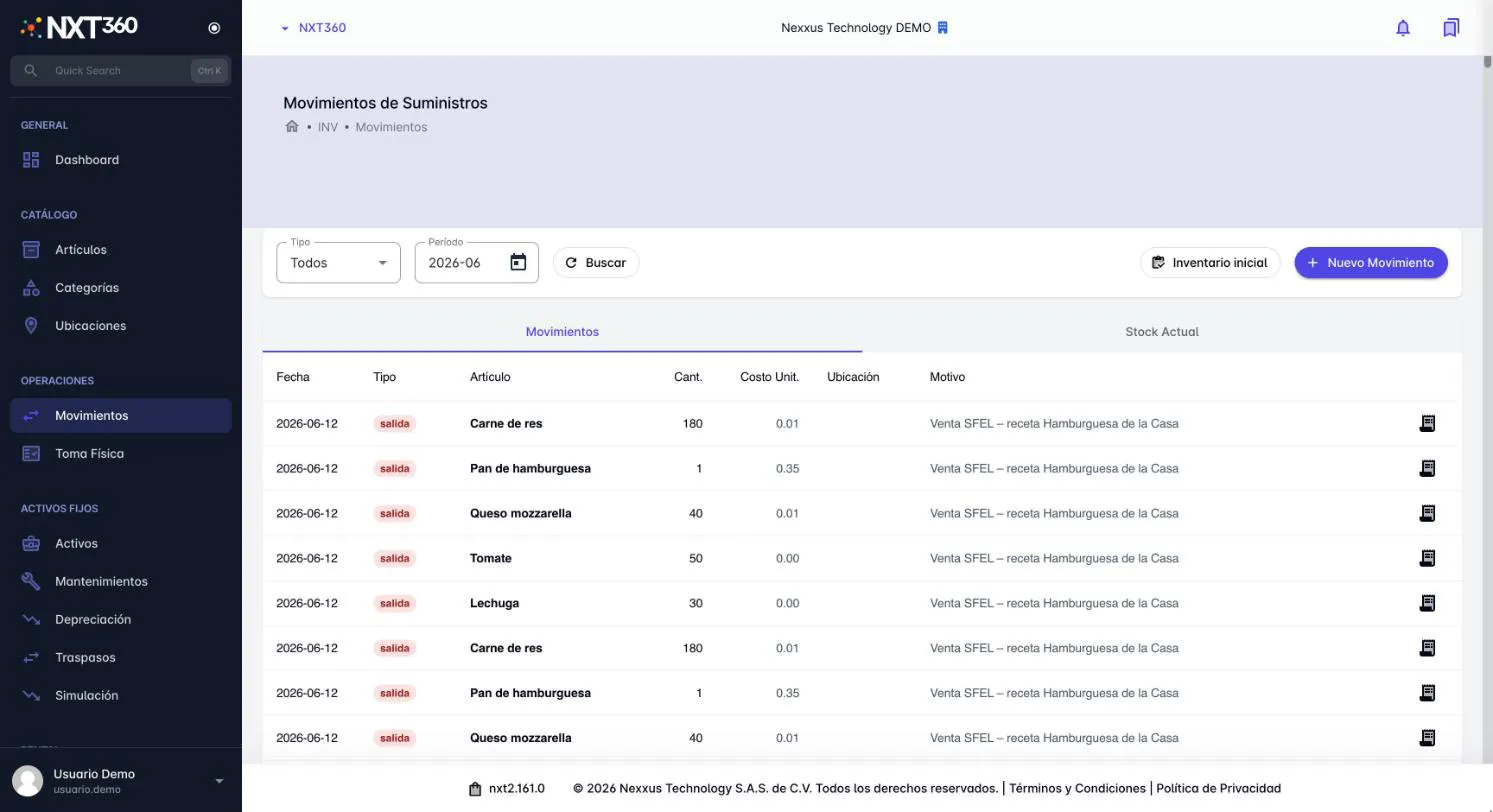
Inventory movements in NXT360: ingredients deducted by recipe, demo account
  • Stock by warehouse and location, movements and stock ledger
  • Batches with expiry dates (first to expire, first out)
  • Recipes, warehouse transfers and reservations
  • Fixed assets with depreciation and maintenance

Operate

Purchasing and supply

Buy better and pay on time: from the quote request to the payable, without re-typing anything.

Connects with

  • Inventory: goods receipt
  • Accounting: journal entry and payable
Purchasing manager checking received goods with the delivery driver
  • Requests for quotation and purchase orders
  • Supplier contracts
  • Accounts payable with automatic journal entries and due-date alerts
  • Email inbox: supplier invoices come in on their own, no typing
  • Supplier withholdings with their receipt

Operate

Projects and services

Deliver on time and bill every hour worked: tasks, hours and service invoicing in one place.

Connects with

  • Waypoint: team hours
  • E-invoicing: the service is invoiced
  • Purchasing: project expenses
Team reviewing a project on a meeting room screen
  • Project and service catalog
  • Tasks, milestones, documents and running totals per project
  • Project dashboard and reports
  • Hours logged from the mobile app, and service invoicing

Operate

Waypoint, the mobile time app

Know who arrived, where they are and what your team is working on, from their phone.

Connects with

  • Projects: hours per task
  • HR: attendance
Field technician in a safety vest logging hours on a phone
  • Time and activity logging with two-step sign-in
  • Leave requests
  • If your company enables it: clock-in and clock-out with photo and location
  • Hour approvals and adjustments by supervisors

Manage

Accounting

Close the month on time: accounting feeds itself from everything that happens across the company.

Connects with

  • Receives entries from invoicing, purchasing, payroll and POS
  • Budgets: execution against what was booked
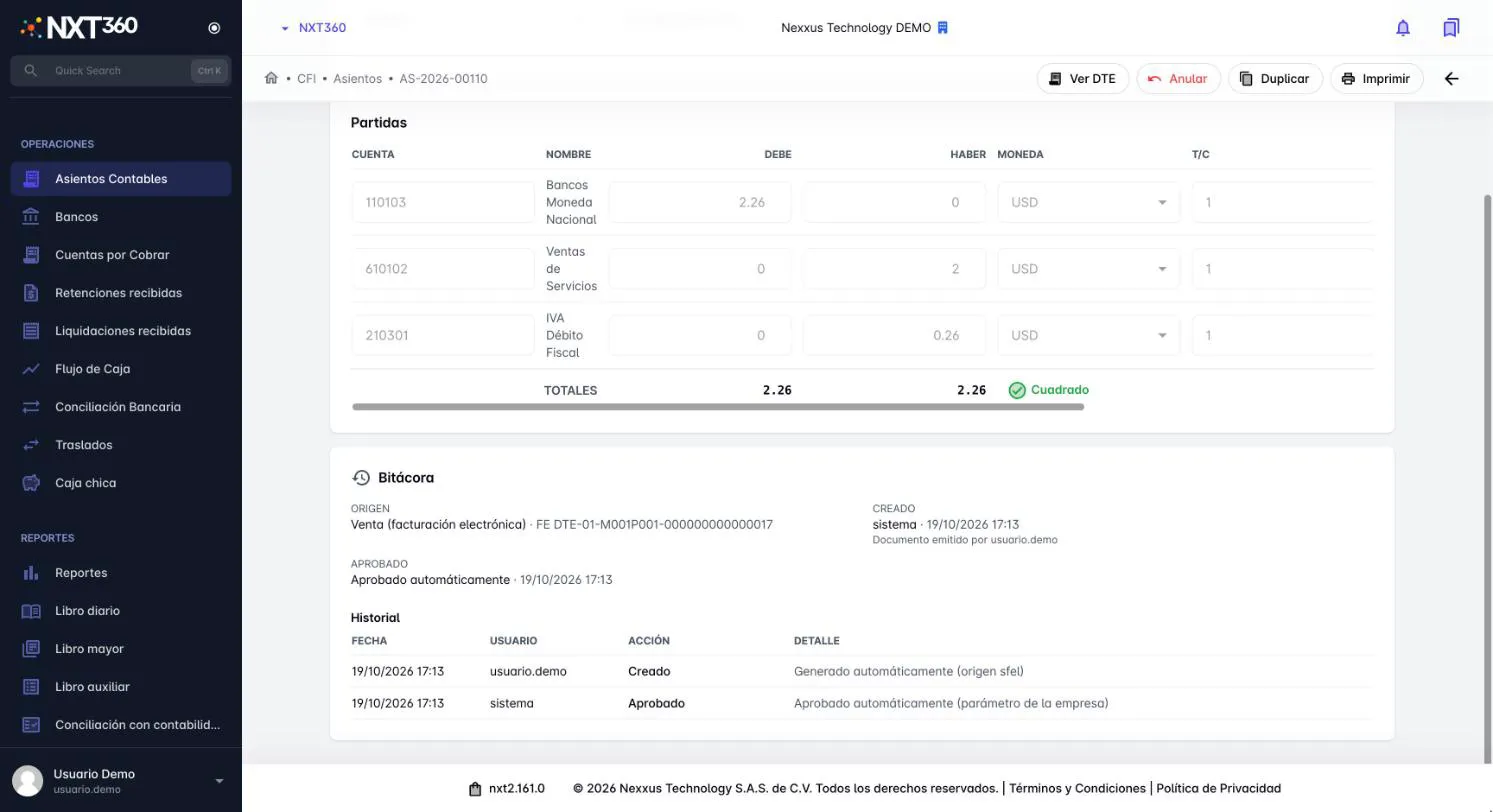
Accountant reviewing reports on two monitors Journal entry generated automatically from e-invoicing, with balanced debits and credits, demo account
  • Chart of accounts under IFRS for SMEs, with bulk import from Excel
  • Manual and automatic journal entries, plus entry templates
  • Cost centers
  • Banks, transfers between accounts and bank reconciliation
  • Petty cash with a custodian, approved settlements and cash counts
  • Accounts receivable, customer advances and cash flow
  • Financial reports and period closing

Manage

HR and payroll

Payroll in hours, not days: calculated with your country’s labor rules and posted to accounting.

Connects with

  • Accounting: entry when payroll is processed
  • Waypoint: clock-ins and leave
HR analyst working with documents and a laptop
  • Employees, personnel actions, leave, advances, attendance and vacations
  • Biweekly and monthly payroll, year-end bonus, vacations and severance
  • Your country’s legal parameters: social security, pensions, income tax and benefits
  • Bonuses and deductions
  • Pay slips by email or WhatsApp, and exportable files
  • Bulk employee upload and employment letters

Manage

Budgets

Control spending before it happens: what you budgeted against what is actually spent.

Connects with

  • Accounting: actual execution by account and cost center
  • Annual budgets by account and cost center
  • Execution tracking against accounting

Manage

Knowledge center

Your team gets answers about the system in seconds, without depending on anyone.

Connects with

  • Every module: answers questions about using the system
  • AI support assistant
  • Knowledge base and private conversations for each company

Which ones does your company need?